
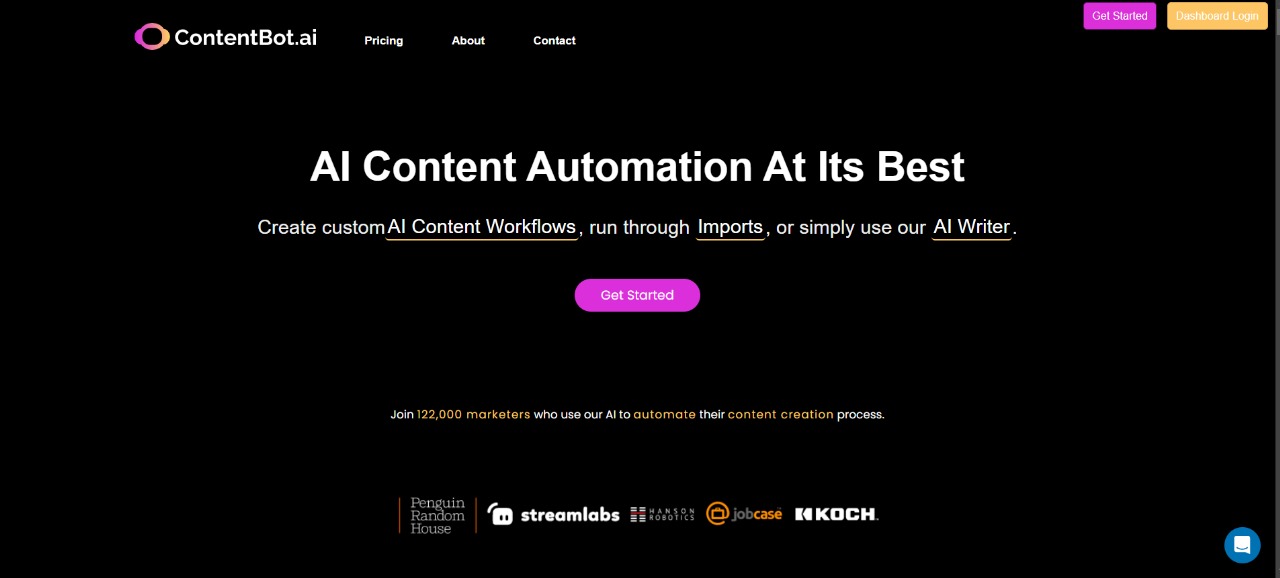
What is ContentBot — the AI that fixes startup copy headaches like product pages and landing variations
Estimated reading time: 10 minutes
Key Takeaways:
- ContentBot helps startups generate consistent and scalable copy quickly.
- It offers purpose-built templates and workflows for various copy needs.
- ContentBot reduces time and cost associated with content creation.
- Ensures consistent brand voice across different channels.
- Facilitates A/B testing with multiple copy variations.
Table of Contents:
- What is ContentBot: an overview of ContentBot AI for startups and eCommerce
- Quick reality check: Slow content creation is killing growth
- Common bottlenecks that make AI tools necessary
- Why these copy problems cost more than they seem
- ContentBot: the practical fix for startup copy headaches
- Using ContentBot step-by-step: set up, run, refine
- Key advantages and expected ROI
- Real-world workflows that save hours every week
- Integrations, limits, and best practices
- Pricing, when to upgrade, and alternatives
- Conclusion
- Frequently asked questions
What is ContentBot: an overview of ContentBot AI for startups and eCommerce
Quick overview: ContentBot is an AI copy generator built to help small teams and startups produce landing pages, product descriptions, emails, and blog drafts faster. If you’ve felt the squeeze of limited time, inconsistent brand voice, or thin template libraries, ContentBot AI is designed to fill those gaps with templates, workflows, and long-form assistants that scale output without hiring more writers.
This post walks through the core problems ContentBot solves — from generating dozens of product/landing copy variations to keeping tone consistent across channels — and shows why it’s a practical tool for startups weighing ContentBot pricing, exploring ContentBot templates, or comparing ContentBot vs Rytr. Keep reading to see concrete examples and what to try first.
Quick reality check: Slow content creation is killing growth
Startups and small eCommerce teams don’t need another tool that adds steps. The main problem is simple: you need repeatable copy — product descriptions, PPC headlines, and landing page variants — but you don’t have the time or people to write them. That’s where ContentBot long-form and ContentBot copywriting features matter.
Instead of one-off drafts, you can spin up consistent variations from templates and refine them with workflows and the Chrome extension, turning one seed idea into ten tested headlines or descriptions.
Think of it like a small factory for words: a single prompt is the raw material, ContentBot templates are the molds, and ContentBot workflows are the conveyor belts that shape and polish copy. For startups, that factory replaces frantic late-night copy edits and keeps your ads, emails, and product pages aligned — so you can iterate faster on messaging and spend less time rewriting.
Common bottlenecks that make AI tools necessary
First, sparse templates for specific use cases. Many teams try general AI prompts and get mediocre output — especially for ecommerce copy templates or niche product descriptions. If you’re searching how to write product descriptions with ContentBot, you want purpose-built prompts that generate bullet-feature lists, benefits-first descriptions, and short SEO snippets without manual rework.
Second, inconsistent brand voice. One person writes the landing page, another handles emails; the result reads disjointed. ContentBot templates and workflows let you lock a tone and reuse it across ContentBot blog drafts, email generators, and landing copy. That reduces the back-and-forth edits and keeps messaging cohesive.
Third, scaling output with limited resources. Startups often need 50+ variants to A/B test, but creating that many by hand costs time and money. Using ContentBot AI and the Chrome extension to generate bulk variations is like hiring a junior copywriter on demand — cheaper and instantly scalable. These three problems compound: templates are sparse, voice drifts, and scaling is slow. Fix one and the others still bite; fix all three and your content engine hums.
Keep scrolling — next we break down why these issues are costly and how small changes in process make a big difference.
Why these copy problems cost more than they seem
When product pages and landing experiments lag, conversion velocity drops. Every week you spend rewriting a single product description is a week of lost data about what messaging actually moves customers. For startups, that delay translates to missed revenue and slower product-market fit.
Beyond money, there’s wasted cognitive load. Teams spend hours debating tone instead of testing offers. That friction eats morale and makes content an afterthought. With a tool built for startup tools and workflows — like ContentBot for startups features and its email generator tutorial capabilities — you convert hours of debate into repeatable output and faster learning cycles.
ContentBot: the practical fix for startup copy headaches
For teams that need volume, consistency, and speed, ContentBot AI is the practical fix. Instead of patching together generic prompts, ContentBot gives startup teams purpose-built ContentBot templates and workflows that turn one seed idea into dozens of on-brand variations—product descriptions, PPC headlines, landing page blocks, and email sequences—without hiring extra writers.
It addresses the main pain points directly: sparse templates are replaced by a library covering product pages, benefits-focused blurbs, SEO snippets for blogs, and cold/outreach emails. Inconsistent voice is solved by locking tone settings and saving preferred styles as reusable presets, so your brand reads the same across a ContentBot blog draft, marketing email, or product listing. Scaling becomes easier because ContentBot long-form and the batch-variation tools let you generate dozens of options in minutes for A/B testing.
If your intent is informational or transactional—searchers asking “What is ContentBot?” or “is ContentBot good for SEO blogs?”—the answer is pragmatic: ContentBot is an AI copywriting assistant built to produce testable, consistent content that startups can iterate on quickly. It’s not just a parrot of phrases; it’s a template + workflow engine that plugs into your process. For teams comparing ContentBot vs Rytr or exploring ContentBot pricing, the value often comes from saved writer-hours, faster experiment cycles, and fewer tone edits.
Practical next steps come in the form of workflow adoption rather than heavy training: pick a template (product page, landing variant, or email), seed it with 2–3 brand anchors, and use the long-form assistant to expand or condense copy. That approach fixes the immediate problems—speed, voice, and scale—without a steep learning curve.

Using ContentBot step-by-step: set up, run, refine
- Sign up and pick a plan. Create an account and scan the template library to match use cases: product descriptions, landing pages, blog outlines, or email sequences. If you want to test without commitment, start on a low-tier plan and upgrade as you measure ROI. (For a detailed AI Tool review that covers features and pricing, see this in-depth ContentBot review.)
- Create brand anchors. Before generating copy, define 3–5 quick brand anchors: target persona, primary benefit, tone (e.g., “helpful, concise, technical”), and any banned phrases. Save these as a preset so every ContentBot copywriting prompt inherits that voice automatically. This reduces back-and-forth edits and keeps messaging consistent across your ContentBot blog pieces and emails.
- Choose a template and seed the prompt. Use a product-description template if you’re wondering how to write product descriptions with ContentBot—these templates prompt for features, pain points, and outcomes, then output benefit-driven bullets, short descriptions, and SEO snippets. For landing pages, pick a headline+hero+CTA template; for email, use the ContentBot email generator tutorial template to produce subject lines and body variants.
- Use long-form for drafts and expansions. The ContentBot long-form assistant is ideal for drafting blog sections, longer product narratives, or multi-paragraph landing text. Start with an outline, feed it the brand anchors and keywords, then refine. When you need multiple angles, request N variations and let the tool spin different tones or value propositions.
- Automate with workflows. ContentBot workflows chain templates together: for example, take a product brief → generate feature bullets → produce 5 headline variants → create email follow-ups. Set up a workflow once, and you’ll produce a consistent bundle of assets for each new product launch or campaign.
- Use the Chrome extension and integrations. Quickly generate copy in your CMS or Google Docs with the ContentBot Chrome extension. Use the extension to create variant headlines directly on live landing pages or to paste product descriptions into your eCommerce backend without switching apps.
- Iterate with metrics. Push generated variations into A/B tests and monitor CTRs, conversion rates, and engagement. The goal is not to accept the first draft but to use ContentBot to populate experiments faster. For teams comparing ContentBot vs Rytr, consider which tool integrates better into your testing cadence and which produces fewer manual edits.
- Scale playbooks. Once you find a winning template + preset combination, save it as a playbook. Use that playbook whenever you add a product, update a landing page, or run a promotion, and you’ll scale output without losing tone.
Practical tip: pair ContentBot with an editorial checklist—SEO title, meta description, H-tags, and internal links—so each generated piece is publishing-ready. For SEO guidance on quality content, consult Google’s Search Central content guidelines to make sure generated blog drafts meet search intent and quality standards.
If you want a quick catalog of other recommended AI tools to compare, this Complete list of recommended AI tools for startups provides alternatives and context.
Key advantages and expected ROI
ContentBot reduces the time-to-first-draft dramatically. Instead of waiting days for a writer, teams can spin up multiple product descriptions and landing variants in under an hour. That time-savings directly translates into faster hypothesis testing—more variations per campaign means more chances to find a winner and faster learning on what messaging converts.
Cost savings are immediate for early-stage startups. Generating bulk copy with ContentBot long-form and templates is cheaper than hiring a mid-level copywriter for every small update. When you factor in reduced revision cycles from locked tone presets and reusable workflows, the effective cost per piece of content drops further.
Quality improves because templates focus output on outcomes, not just features. ContentBot templates encourage benefit-first language and SEO-friendly snippets, which helps answer questions like “is ContentBot good for SEO blogs” by producing structured drafts that are easier to optimize. The Chrome extension and workflow automation reduce context switching, so developers and marketers spend less time moving copy between tools.
Scalability is the final ROI lever. With saved playbooks and workflow automation, you can produce dozens of landing tests or hundreds of product variants without proportional hires. That means higher conversion velocity, faster product-market fit, and clearer brand voice across channels.
If you’re still weighing ContentBot pricing against other options or exploring ContentBot AI alternatives, remember that the biggest return is not the lowest price per word—it’s the speed of learning and the consistency of messaging across your growth experiments.
What is ContentBot in practical terms? It’s an AI-first copy factory designed to help startups scale consistent, testable copy quickly—so you can spend more time iterating on offers and less time drafting words.
Real-world workflows that save hours every week
Start with three repeatable playbooks your team can adopt in the first week.
- Example 1: Product launch bundle. Seed a product brief into a product-description template, use ContentBot long-form to expand feature narratives, then run the headline generator to create five hero variants. Finish by exporting email follow-ups via the ContentBot email generator tutorial and schedule A/B tests.
- Example 2: Landing page rapid-test. Use a landing-page template to produce 3 hero + CTA combos, apply the batch-variation tool to generate micro-copy (microcopy for buttons, badges, and benefit bullets), then push variants directly into your CMS with the ContentBot Chrome extension.
- Example 3: Weekly content sprint. Draft an outline in ContentBot long-form, ask for SEO snippets and meta descriptions, then create social captions for each blog post. Save that chain as a workflow so the next sprint needs only new keywords and a few edits.
These playbooks tackle startup pain points: limited time, inconsistent brand voice, and the need for many copy variations. Use saved presets so every generated asset aligns with brand anchors without rewrites.
Integrations, limits, and best practices
ContentBot integrates smoothly with common workflows — Chrome extension, API access, and CMS copy-paste make it a low-friction tool for teams. Combine it with analytics and an editorial checklist (H-tags, meta tags, internal links) to keep generated drafts publishing-ready. For SEO standards, see Google’s Search Central content guidelines to ensure alignment with search intent.
Know the limits: AI drafts still need human review for accuracy, legal checks, and brand nuance. Avoid blindly publishing sensitive claims or product specs. Best practice is a two-step process: generate multiple options, then have a reviewer select and refine the top 1–2 variants. Use A/B testing to validate top performers instead of relying on subjective preferences.
Document successful playbooks and keep a simple QA checklist: tone, facts, CTA clarity, and SEO fields. That process will reduce rework and preserve the efficiency gains from ContentBot workflows.
Pricing, when to upgrade, and alternatives
Start with a low-tier plan to validate ROI: focus on creating playbooks and measuring conversion lift before scaling seats. Upgrade when you hit consistent needs for more long-form content, larger batch runs, or team-level features like shared presets and workflow automation.
When comparing ContentBot vs Rytr or exploring ContentBot AI alternatives, weigh integration needs, template depth, and long-form quality. ContentBot templates and workflow automation often favor teams that need repeatable bundles (product pages + emails + social), while some alternatives may be cheaper per word but require more manual orchestration.
For a detailed breakdown of features and pricing, read this in-depth ContentBot review. If you want to compare other tools for startup workflows, check this complete list of recommended AI tools for startups to find the right fit for your budget and use cases.
Conclusion
ContentBot is built for teams that need reliable speed, consistent voice, and repeatable outputs. It’s most valuable when you pair templates with saved brand presets and automate common chains—product brief to landing page to email sequence. That combination addresses key startup pain points: generating many product and landing variations quickly, conserving limited resources, and keeping a unified brand voice across channels.
Adopt incremental workflows: validate one playbook with metrics, then scale the successful sequence into other product lines. Use the Chrome extension and long-form assistant to reduce context switching and keep drafts in your publishing tools. Remember the limits — human oversight, fact-checking, and SEO tuning remain essential. But when used as a productivity engine for copywriting, ContentBot AI helps small teams test more messaging, iterate faster, and lower time-to-first-draft. If you’re asking “What is ContentBot?” — it’s an AI-first copy engine designed to help startups scale consistent, testable copy without adding headcount.