

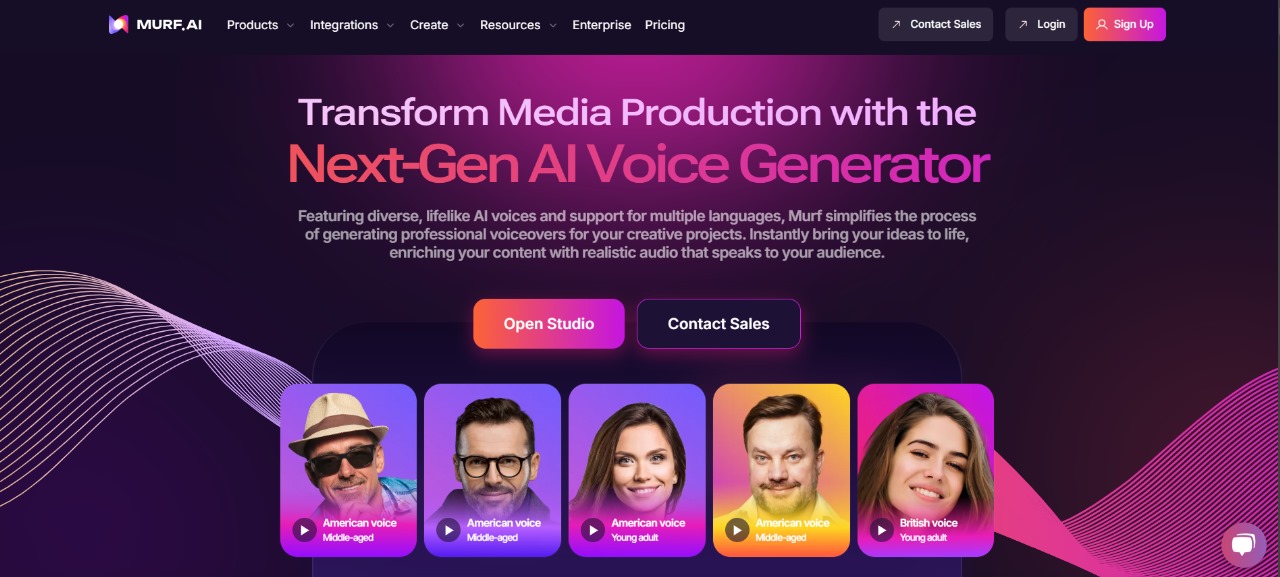
What is Murf AI: The Practical Fix for Expensive, Inconsistent Voiceovers
Estimated reading time: 7 minutes
Key Takeaways:
- Murf AI offers an affordable and consistent solution for high-quality voiceovers.
- Eliminates the need for multiple freelancers and reduces production time.
- Includes features like voice cloning, background music, and clear commercial licensing.
- Suitable for various content creators, including YouTube creators and advertisers.
- Integrates seamlessly into existing workflows and supports team collaboration.
Table of Contents:
- What is Murf AI — A Practical Overview
- The Creator Problem That Begs the Question “What is Murf AI”
- Other Voiceover Headaches Solved by Murf AI
- Why These Issues Cost You Time and Money
- Murf AI as the Practical Fix for Fast, Consistent Voiceovers
- Step-by-Step: Creating Professional Voiceovers in Murf Studio
- Key Benefits and Expected ROI
- Advanced Tips to Get the Most from Murf Studio
- Pricing, Plans, and Choosing the Right Level
- When to Pick Murf vs Other Voice Tools
- Integrations and Production Workflow
- Final Thoughts
- Frequently Asked Questions
What is Murf AI — A Practical Overview
Murf AI is a text-to-speech and voiceover generator built for creators who need realistic, commercial-ready narration without the cost or hassle of studio recording. Think of it as a digital studio: Murf studio provides a palette of Murf voices you can tweak for tone, pace, and accent, then export as finished voiceovers for videos, ads, or podcasts. It bundles AI narration, voice cloning, and background music controls so you can assemble a professional track in minutes rather than days.
This tool addresses core pain points: affordable talent scarcity, inconsistent accents and quality, and confusion about commercial rights. Whether you’re testing Murf AI pricing or comparing Murf vs ElevenLabs and PlayHT, Murf aims to be the all-in-one solution for fast, reliable voiceovers. Keep reading to see how this practical tech replaces time-consuming recording setups and multiple freelancers — and how it fits into real workflows.
The Creator Problem That Begs the Question “What is Murf AI”
Most creators ask “What is Murf AI?” after a painful, repeated problem: you need clean, convincing voiceovers but hiring talent is expensive, and DIY setups sound amateur. Imagine launching a YouTube series and scrambling to match accents or voices across episodes — that inconsistency damages brand trust. Or picture running ad campaigns where each voice clip needs different tones and fast turnarounds; paying hourly talent or booking studios slows you down and inflates costs. Murf AI solves that by offering Murf voices that range from conversational to authoritative, plus tools for adjusting emphasis and timing so one person can reproduce many styles.
Another common scenario: licensing confusion. You might get a great TTS sample but worry about Murf commercial rights or whether a voice clone is allowed for ads. That uncertainty forces legal review or avoids opportunities. Murf AI centralizes usage terms and offers commercial licensing options to reduce that friction. If you’re comparing Murf AI vs ElevenLabs vs PlayHT, one metric to watch is how straightforward the commercial rights and export options are — because clarity here saves campaigns from being delayed or pulled. Scroll on — the next section breaks these issues into concrete problems and shows practical fixes.
Other Voiceover Headaches Solved by Murf AI
Beyond cost and licensing, creators face quality and style fragmentation. You might get a great American accent but need British or neutral global English for another market — juggling multiple voice actors becomes a logistics nightmare. Murf voices include regional accents and styles, and Murf studio allows quick swaps so one script can be tested with several narrators in minutes. That agility means faster iteration and lower production overhead.
Technical setup is another drain. Recording clean audio requires rooms, mics, and editing knowledge; one noisy take can ruin a whole session. Using Murf AI’s text-to-speech removes mic setups and recording fatigue. It’s like swapping a clunky old camera for a smartphone: you lose the hair-splitting control of a pro studio but gain speed and consistency. For teams that need multiple voices/styles across e-learning, ads, and YouTube content, that tradeoff often boosts output without sacrificing audience trust. Keep going — the next part explains why these problems are costly and how Murf mitigates the financial hit.
Why These Issues Cost You Time and Money
Hiring multiple voice actors, renting studios, and re-recording due to mismatch adds direct costs and delays. Missed deadlines or inconsistent branding can reduce conversions and viewership.
Murf AI reduces those expenses by centralizing voice options, simplifying licensing, and cutting recording time — turning a multi-day production into a matter of hours.
Murf AI as the Practical Fix for Fast, Consistent Voiceovers
Murf AI fixes the core creator headaches by turning complex audio production into a simple, repeatable workflow. Instead of juggling multiple freelancers, studios, and file formats, you get an integrated voiceover generator that combines text-to-speech with a timeline editor, background music, and export-ready licensing options. Murf voices cover a wide range of tones and regional accents, so you can match brand voice across episodes, ad variations, and localized campaigns without rebooking talent.
Commercial rights and export clarity are built into the platform, reducing legal friction when you need voiceovers for ads, paid content, or client projects. For teams worried about “who owns the audio,” Murf commercial rights and clear usage terms remove that uncertainty and speed approvals. If you need one-off personality or exact voice matches, Murf voice cloning tools let you reproduce a specific timbre while keeping compliance options front and center.
The real operational win is velocity. A script that would take hours of recording, editing, and mixing can be produced, reviewed, and finalized in under an hour. That’s not just convenience — it’s faster iteration, lower production cost, and the ability to A/B test narration styles across campaigns. Whether you’re exploring Murf AI pricing or comparing Murf vs ElevenLabs or PlayHT for tone and output, Murf’s combination of usability, licensing transparency, and Murf studio controls make it a practical fix for creators who need reliable, commercial-ready narration now.
Step-by-Step: Creating Professional Voiceovers in Murf Studio
1) Sign up and choose your workspace
Create an account and set up a project or workspace. Choose your subscription level depending on production needs — higher tiers unlock more advanced Murf studio features and commercial export options. This is where you’ll manage collaborators, file versions, and export settings.
2) Paste or import your script
Copy-paste your script or import a text file. The interface shows your script broken into editable lines, which makes timing and emphasis adjustments straightforward. Use simple markup (pauses, punctuation, emphasis tags) to guide the AI narrator’s cadence.
3) Pick a Murf voice and preview
Browse the Murf voices library by style, language, and accent. Test a few voices quickly — the text to speech preview plays instantly. If you’re benchmarking, you can compare a voice sample here against alternatives like ElevenLabs or PlayHT to judge realism and expressiveness. Swap voices in seconds without re-recording the script.
4) Fine-tune prosody and pronunciation
Use Murf studio’s controls to change speed, pitch, and emphasis. There are pronunciation editors for proper nouns, brand names, and acronyms. These micro-adjustments are where AI narration moves from robotic to natural — and they’re much faster than re-scheduling a recording session.
5) Use voice cloning if needed
For brand continuity, use Murf voice cloning to create a bespoke voice profile. Upload reference audio, follow the guided training steps, and the platform generates a custom voice that matches tone and inflection. Check licensing options carefully — Murf offers controls around cloned-voice commercial use.
6) Add background music and effects
Drag background tracks onto the timeline and set volume envelopes per section. Murf AI background music tools let you create fade-ins, ducking under speech, and layered ambiences. There are presets designed for ads, podcasts, and explainer videos to speed production.
7) Collaborative editing and versioning
Invite teammates to comment and make edits directly in the project. Version history lets you roll back changes or A/B test different narrators and mixes. For agencies or course creators, this makes iterative review painless.
8) Export with the right license
Choose your export format and confirm commercial rights at export. Murf studio includes options for ad use, broadcast, or internal use depending on your plan. Confirming Murf commercial rights during export prevents downstream legal headaches and ensures compliance for monetized content.
9) Iterate and scale
Once a master voice and workflow are set, replicate it across episodes, ad sets, or localized variations. Using the same Murf voice profiles and templates preserves brand consistency and slashes turnaround for future projects. If you want a deeper look at platform features and real-world tests, the in-depth Murf AI review and AI Tool review on Charlie AI Tools breaks down capabilities and pricing in detail.

Key Benefits and Expected ROI
Faster production cycles translate directly into cost savings. Replacing one or two studio sessions per month with Murf studio can free up hundreds — sometimes thousands — in recurring project costs. For small teams, that reduction in overhead means more budget for creative testing and distribution.
Consistency boosts conversions. Using a stable set of Murf voices across a campaign reduces cognitive friction for your audience, improving brand recognition and viewer retention. That consistency is particularly important when asking “is Murf AI good for YouTube” — creators report cleaner audio, predictable delivery, and fewer re-dos compared with remote recording sessions.
Legal clarity reduces risk. Clear Murf commercial rights and export options cut the time spent on legal review and approvals, which accelerates campaign launches. For agencies, that reliability means fewer client delays and better on-time delivery metrics.
Scalability and experimentation are easier. With templates, voice cloning, and batch exports, you can produce multiple ad variations or localized voiceovers quickly — a clear edge when running paid campaigns or testing audience segments. That speed often yields better ROI because you can iterate creative faster than competitors.
Lower technical overhead. No more booking studios, managing mics, or cleaning noisy recordings. The platform reduces the need for specialized audio engineers, saving payroll and shortening the feedback loop. If you want to explore similar or complementary tools, check a comprehensive directory of AI tools that compares features and workflows.
If you need to compare voice quality across vendors, the Murf AI vs ElevenLabs vs PlayHT comparisons help you choose the best voice for your budget and use case. For many creators asking “What is Murf AI” the answer is increasingly practical: a full-featured text to speech and voiceover generator that replaces slow, costly recording workflows while providing commercial-ready narration and consistent Murf voices across projects.
Advanced Tips to Get the Most from Murf Studio
Short, deliberate edits yield the biggest quality gains. Break long paragraphs into multiple lines in the script editor so Murf voices can place natural pauses. Use the pronunciation editor for brand names and acronyms — that fixes most awkward reads without manual audio editing. When you need emotion, layer small pitch and speed shifts instead of extreme values to keep the voice natural.
Create reusable templates for tone and pacing. Save a “friendly narrator” and a “concise ad” template with predefined speed, pitch, and background-music ducks. Templates speed batch projects and ensure consistent AI narration across episodes or ad sets.
Leverage voice cloning selectively. For brand continuity, Murf voice cloning can reproduce a familiar timbre. But keep legal compliance in mind: review Murf commercial rights for cloned voices before using them in paid ads or client deliverables. If you’re comparing options, read our detailed Murf AI review to understand limitations and best practices.
Use the timeline for musical dynamics. Add background music tracks and apply automated ducking so speech cuts through without manual mixing. For step-by-step music routing and volume envelopes, check Murf AI background music tutorial resources or study mixing basics on audio guides like those at PlayHT.
Pricing, Plans, and Choosing the Right Level
Murf AI pricing varies by usage. Lower tiers are perfect for solo creators producing occasional voiceovers; higher tiers unlock commercial exports, advanced voices, and team features. If your work includes client ads or monetized videos, pick a plan that explicitly includes Murf commercial rights to avoid surprises at export.
Start with a trial or monthly plan to test voice quality and workflow. Compare costs per hour of finished audio to what you’d pay for studio time or freelancers — often Murf pays for itself in a few projects.
When to Pick Murf vs Other Voice Tools
Choose Murf when you need an all-in-one voiceover generator with built-in studio controls, background music, and clear export licensing. Murf studio is strong for teams that require versioning, collaboration, and consistent brand voices across multiple assets.
If your priority is hyper-realistic single-sentence reads or experimental voice synthesis, alternatives like ElevenLabs may edge out in raw expressiveness for some voices; see ElevenLabs for examples. For bulk narration and website widgets, PlayHT offers different pricing models and player integrations. Evaluate voice quality (Murf voices), licensing, and workflow fit rather than headline realism alone.
Integrations and Production Workflow
Murf integrates into typical content stacks via export file options and simple file transfers. Pull generated narration into video editors, course platforms, or ad builders. Use brief naming conventions and metadata on export to keep versions organized when you batch-produce for channels like YouTube or paid ads.
For teams, add Murf to your project management flow: create tasks for script edits, attach the Murf project link, and route approvals inside the workspace. This minimizes back-and-forth and eliminates repeated re-recordings that eat time.
Final Thoughts
Murf is a practical, accessible solution for creators struggling with high voiceover costs, inconsistent accents, and licensing confusion. Its combination of Murf voices, timeline-based editing, and clear Murf commercial rights simplifies production while enabling scale. Whether you’re producing ads, explainer videos, or YouTube series, the speed and consistency you get from Murf studio let you iterate more tests and ship more content.
If you need custom timbre or brand continuity, Murf voice cloning is a powerful tool — just pair it with the right commercial license. When comparing Murf AI pricing and capabilities to alternatives like ElevenLabs and PlayHT, assess total workflow time and licensing certainty, not just raw audio samples. Ultimately, the question “What is Murf AI” resolves into this: a text to speech and voiceover generator designed to replace slow, costly recording workflows with fast, repeatable, commercial-ready narration.


