Key Takeaways:
- Mixo is a rapid AI landing page builder that excels at initial idea validation.
- It’s perfect for building a preliminary email waitlist quickly and easily.
- While fast and user-friendly, it has limitations in design customization and scalability.
- For complex projects, consider more robust platforms, but for quick validation, Mixo is a great starting point.
What is Mixo and Why is Everyone Talking About This AI Page Generator?
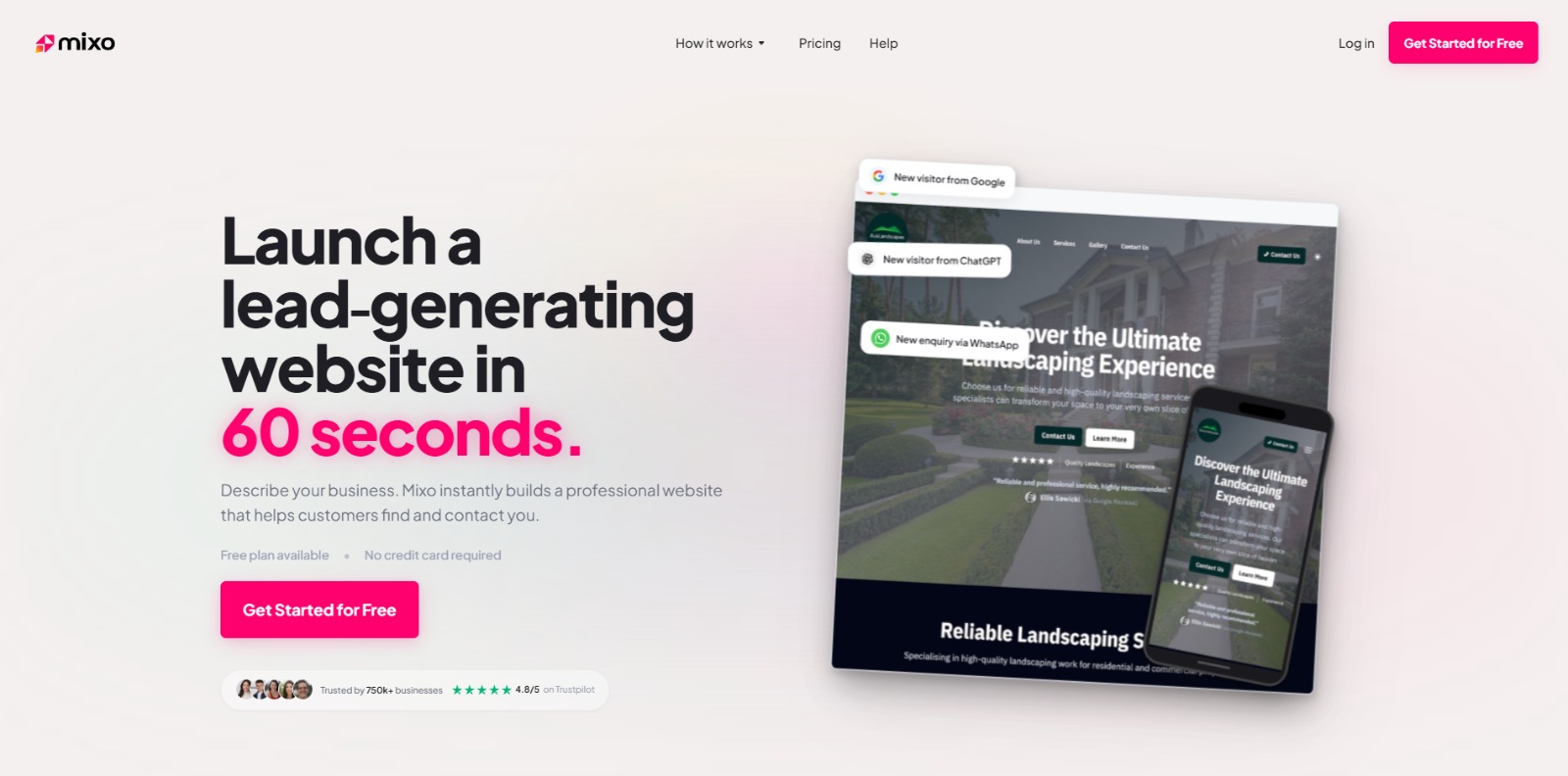
In the bustling landscape of startup tools, Mixo has emerged as a compelling solution for entrepreneurs and side-hustlers seeking to rapidly validate their ideas. But what exactly is Mixo? It’s an AI-powered website generator that allows you to create a fully functional landing page in minutes, often described as a startup website generator designed to get your concept online fast.
The core promise of Mixo is simple: bypass the technical headaches and launch a professional-looking site to start collecting email waitlists and gauge interest in your product or service. It’s a no-code website maker that focuses on speed and ease of use, making it an attractive option for those without design or development expertise. But does it live up to the hype? Let’s dive in.
Is Mixo’s “Too Good To Be True” Speed Limiting Your Long-Term Vision?
Mixo’s biggest strength – its lightning-fast website creation – can also be a source of frustration down the line. While it excels at quickly generating a basic landing page, users often find themselves bumping against limitations when they want to deeply customize the design or add more complex functionality. The initial excitement of launching a site in minutes can fade when you realize the platform’s constraints on long-term scalability and intricate design tweaks.
Think of it like this: Mixo is fantastic for building a quick prototype of a house. You can get the basic structure up in record time, but when you want to add custom windows, change the layout, or expand the building, you’ll quickly realize you’re working within a pre-defined framework. The beauty of the AI page generator becomes a cage as your ambitions grow beyond the initial scope.
Beyond the Initial Spark: The Frustration of Limited Design and Scaling Capabilities
Many Mixo reviews point to the same issues: limited control over design elements, difficulty in scaling beyond a simple landing page, and the lack of advanced features that are standard in more robust website builders. While the AI handles the initial layout and content generation well, tweaking specific elements to match your brand can be surprisingly difficult. You might find yourself wrestling with a system that prioritizes speed over granular control.
Furthermore, the challenge of scaling beyond a single landing page can become a major hurdle. While Mixo is perfect for idea validation and building an email waitlist, it may not be the ideal platform for building a comprehensive website with multiple pages, e-commerce functionality, or a blog. As your project evolves, you might find yourself outgrowing Mixo’s capabilities faster than you anticipated.
Hidden Costs & Headaches: Why “Fast” and “Easy” Can Lead to Expensive Rebuilds Later
The allure of a no-code website maker is undeniable, especially when you’re trying to save time and money. However, the limitations of Mixo – particularly its limited design flexibility and scaling options – can actually increase your costs in the long run. Imagine spending weeks building your initial presence on Mixo, only to realize that you need to completely rebuild your site on a different platform to accommodate your growing needs. All that initial effort is essentially lost, replaced by the cost and hassle of migrating to a new system.
This “rebuild tax” isn’t just about money; it’s also about time and energy. The frustration of hitting a wall with Mixo, after investing significant effort into the platform, can be demoralizing. It’s crucial to weigh the initial benefits of speed and simplicity against the potential costs and headaches of outgrowing the platform down the line. Before diving in, ask yourself: Is this AI landing page builder a stepping stone, or a potential dead end?
Unveiling Mixo: The Practical Fix for Idea Validation
Despite its limitations, Mixo remains a powerful tool for a specific purpose: rapid idea validation. It excels at helping you quickly create a professional-looking waitlist landing page to gauge interest in your product or service. Think of it as the ultimate MVP (Minimum Viable Product) builder, allowing you to test the waters without investing significant time or money in development or design. It’s a great startup website generator for those in the very early stages.
For entrepreneurs struggling with “blank page syndrome” or lacking technical skills, Mixo offers a genuinely accessible way to get their ideas online. The AI-powered website generator removes the friction of traditional website building, allowing you to focus on the core value proposition of your business. You can generate a site from a simple description and start subscriber capture almost immediately. If your primary goal is to validate an idea and build an early email waitlist, Mixo provides a streamlined and cost-effective solution. Ready to give it a try? You can start building your landing page today by visiting Mixo.io.
From Idea to Launch: A Step-by-Step Guide to Using Mixo
So, how does this AI page generator actually work? Let’s walk through the process of creating a landing page with Mixo, from initial idea to a live, shareable website. The process is surprisingly simple, and it highlights Mixo’s focus on speed and ease of use, making it a great no-code website maker for beginners.
The Google Search Intent behind “how to build a landing page with Mixo” is to find a fast and simple solution. Mixo caters to this by providing an intuitive interface that requires no prior coding or design knowledge. This step-by-step guide will show you exactly how to leverage Mixo’s AI capabilities to bring your ideas to life quickly.
Step 1: Describe Your Startup Idea
The first step is to simply describe your startup idea in a sentence or two. This is where Mixo’s AI starts to work its magic. The more descriptive you are, the better the AI can understand your vision and generate a relevant landing page. Think about the core problem you’re solving, your target audience, and the unique value proposition of your product or service. For example, instead of saying “a fitness app,” try “a personalized workout app that creates custom routines based on your fitness level and goals.”
Step 2: Let AI Generate Your Initial Landing Page
Once you’ve entered your description, Mixo’s AI will generate an initial landing page design, complete with a headline, subheadline, images, and a call-to-action. This process usually takes less than a minute. Don’t expect perfection at this stage; the AI is providing a starting point, not a finished product. Review the generated content and design to see if it aligns with your vision. If not, you can tweak your initial description and regenerate the page.
Step 3: Customize Your Design and Content
Now comes the customization phase. Mixo provides a range of options for tweaking the design and content of your landing page. You can change the headline, subheadline, and body text to better reflect your brand messaging. You can also upload your own logo and images, or choose from Mixo’s library of stock photos. While the design options are somewhat limited compared to more robust website builders, they are sufficient for creating a professional-looking landing page. Pay attention to the color scheme and typography to ensure your site aligns with your brand identity.
Step 4: Set Up Your Subscriber Capture Form
A key goal of most landing pages is to capture email addresses. Mixo makes this easy with its built-in subscriber capture form. You can customize the form to ask for specific information, such as name, email, and any other relevant details. Once someone submits their information, it’s automatically added to your Mixo subscriber list. This list can be exported for use with other email marketing platforms, or you can use Mixo’s built-in email marketing tools to send updates to your subscribers. This is crucial for building your email waitlist.
Step 5: Connect Your Custom Domain and Configure SEO Settings
To give your landing page a professional touch, you’ll want to connect it to your custom domain. Mixo provides clear instructions on how to do this, which typically involves updating your DNS records with your domain registrar. Mixo also allows you to configure basic SEO settings, such as meta titles and descriptions. While Mixo’s SEO capabilities are limited, they can help improve your visibility in search results. Make sure to include relevant keywords in your meta descriptions to attract potential visitors. This answers the Google Search Intent “Does Mixo support custom domains/SSL”.
Step 6: Launch and Share Your Landing Page
Once you’re satisfied with your design, content, and settings, it’s time to launch your landing page! Mixo provides a simple one-click launch process. Once launched, your landing page will be live and accessible to anyone with the URL. Share your landing page on social media, email, and any other relevant channels to start driving traffic and capturing leads. Remember to track your results to see how well your landing page is performing and make adjustments as needed.
Unlocking Rapid Growth: The ROI of Mixo’s Simplicity
The key benefits of using Mixo center around speed, simplicity, and cost-effectiveness. For early-stage startups and side-hustlers, these are invaluable assets. The ability to go from idea to live waitlist landing page in a matter of hours can be a game-changer, allowing you to quickly gauge interest in your product or service and gather valuable feedback. This is significantly faster and cheaper than traditional website development, making Mixo a compelling option for those on a tight budget.
The expected ROI of using Mixo is directly tied to its ability to accelerate the idea validation process. By quickly building an email waitlist and gathering feedback, you can reduce the risk of investing time and money in a product or service that no one wants. Mixo’s no-code website maker approach democratizes the process of launching a startup, empowering anyone with an idea to get their concept online and start building an audience.
Now that you know What is Mixo, explore our Mixo Review for a practical breakdown of its strengths and limitations.
.
Key Takeaways: Is Mixo the Right Tool for Your Project?
In conclusion, Mixo stands out as a rapid AI landing page builder ideal for initial idea validation and building a preliminary email waitlist. Its strength lies in its remarkable speed and user-friendly interface, enabling the swift creation of a professional-looking waitlist landing page without the need for coding skills.
This makes it an excellent startup website generator for those in the very early stages of their entrepreneurial journey. However, it’s crucial to acknowledge its limitations in design customization and scalability. For projects requiring intricate design control or extensive functionality, more robust platforms might be necessary. Evaluate your long-term vision, and if your immediate need is fast validation and subscriber capture, Mixo could be the perfect starting point.
Ready to Validate Your Vision?
Stop dreaming and start building! Mixo eliminates the technical barriers that hold back so many aspiring entrepreneurs. In just minutes, you can have a professional-looking landing page up and running, collecting valuable leads and proving that your idea has real potential. Don’t let another day go by without taking action.
With it’s simple features and interface, building a waitlist landing page is really simple.
Take the leap and bring your startup idea to life today!
Mixo FAQs
Is Mixo free, and what’s included in the free plan?
Is Mixo free, and what’s included in the free plan?
What are the differences between Mixo Basic, Growth, and Pro plans?
What are the differences between Mixo Basic, Growth, and Pro plans?
How does Mixo compare to alternatives like Durable or 10Web?
How does Mixo compare to alternatives like Durable or 10Web?
How quickly can Mixo launch a site, and what are the key steps involved?
How quickly can Mixo launch a site, and what are the key steps involved?
CharlieAITools was created with love to help you discover the best AI tools and transform your life, your ideas, and your projects. By signing up through my affiliate link, you help me keep this site running and continue to share valuable resources with fellow entrepreneurs. Thanks a ton for your support!