Key Takeaways:
- Capsule CRM is a cloud-based CRM solution designed for small and medium-sized businesses, offering essential CRM functionality in an intuitive and affordable package.
- Capsule CRM helps rescue businesses from the chaos of spreadsheets by centralizing customer data, tracking sales deals, and improving team collaboration.
- While Capsule CRM excels in simplicity, consider integration headaches, user adoption challenges, and scalability concerns before making a decision.
- Implementing Capsule CRM can lead to increased sales conversions, reduced administrative overhead, and enhanced customer satisfaction.
- Getting started with Capsule CRM involves account creation, importing contacts, defining sales stages, creating opportunities, and leveraging integrations for enhanced productivity.
What is Capsule CRM? The Simple CRM Solution for SMBs
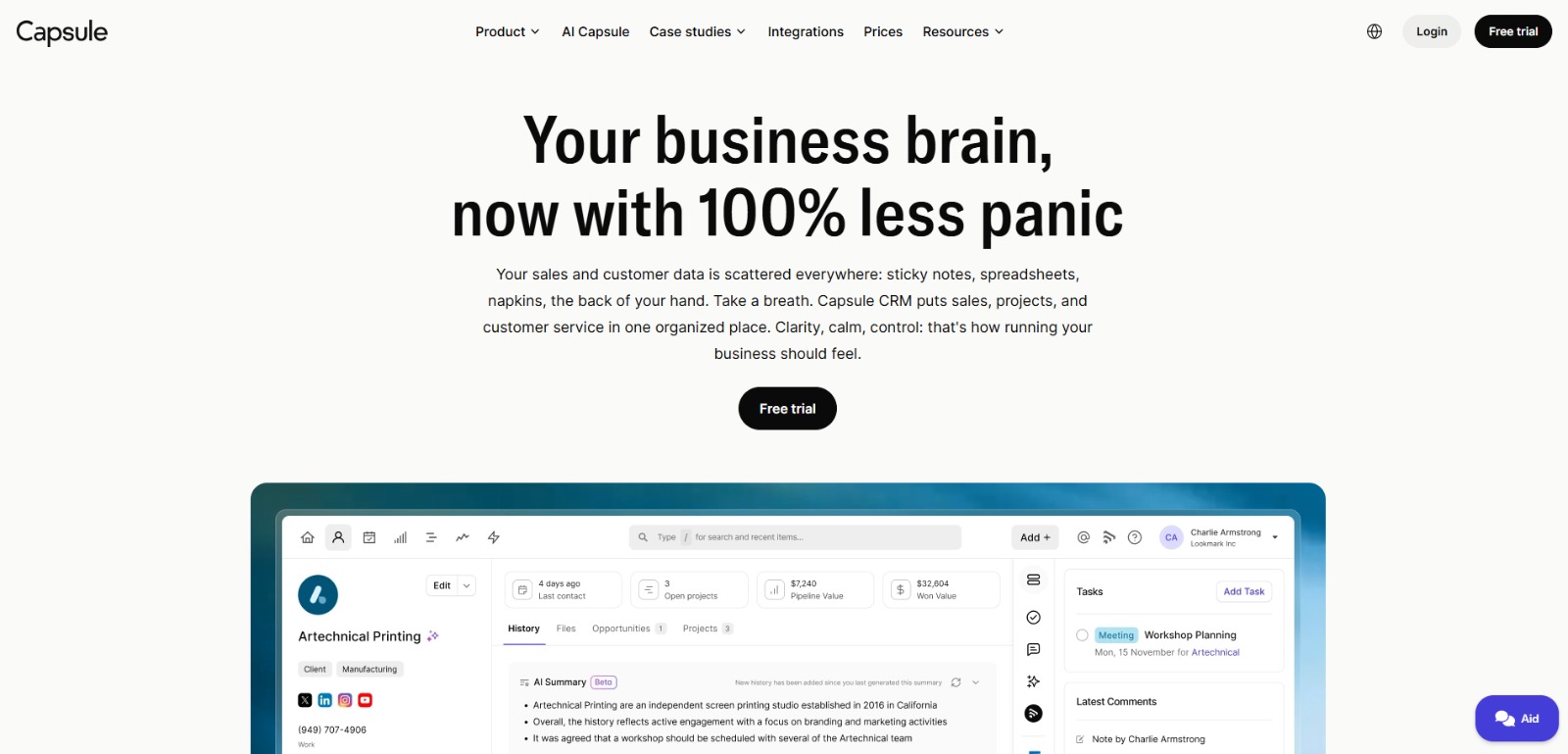
Capsule CRM is a cloud-based customer relationship management (CRM) solution designed specifically for small and medium-sized businesses (SMBs). Unlike some of its more complex competitors, Capsule CRM prioritizes simplicity and ease of use. Its core focus is on providing essential CRM functionality – contact management, sales pipeline management, and task management – in an intuitive and affordable package.
The platform helps businesses organize customer data, track sales deals from lead to close, and collaborate effectively as a team. Capsule CRM also offers a range of Capsule CRM integrations with popular business tools, such as Gmail, Xero, and Mailchimp, allowing users to connect their CRM with their existing workflows. Capsule CRM aims to be the antidote to CRM complexity, offering a straightforward solution for businesses that need to manage customer relationships without getting bogged down in unnecessary features.
Drowning in Spreadsheets? How Capsule CRM Can Rescue Your Sales Pipeline
Imagine spending hours each week manually updating spreadsheets, searching through emails for customer information, and struggling to keep track of where each deal stands. This is the reality for many small businesses relying on outdated or inadequate systems for managing their sales pipeline. The result? Missed opportunities, lost leads, and a chaotic sales process that hinders growth.
Trying to scale your business using spreadsheets is like trying to build a house with only a hammer and nails – it’s inefficient, time-consuming, and ultimately unsustainable. The lack of a centralized system for managing contacts and deals leads to inconsistencies, errors, and a significant drain on productivity. You and your team are spending more time on administrative tasks than on actually selling, which directly impacts your revenue and profitability.
Furthermore, relying on spreadsheets makes it difficult to get a clear overview of your sales performance. You can’t easily track key metrics like conversion rates, deal velocity, or average deal size, which are essential for making informed decisions and optimizing your sales strategy. This lack of visibility leaves you in the dark, unable to identify bottlenecks or areas for improvement.
Beyond the Basics: Addressing Integration Headaches, User Adoption Challenges, and Scalability Concerns
While Capsule CRM excels in its simplicity, some businesses may encounter hurdles related to specific needs. Consider the complexities of migrating data from an existing, possibly clunky, CRM. The process can be daunting, filled with potential for data loss or corruption if not handled carefully. Getting your finance and marketing integrations smoothly configured is also crucial. A disconnect between your CRM and accounting software (like Xero or QuickBooks) can lead to reconciliation nightmares. Similarly, a fractured link with your email marketing platform (like Mailchimp) hinders targeted campaign effectiveness.
Another significant hurdle can be user training and adoption. Even with a user-friendly interface, transitioning a team accustomed to their old workflows requires time, patience, and dedicated training resources. Overlooking this aspect often leads to underutilization of the CRM’s capabilities and frustration amongst team members. Finally, it’s crucial to consider the scaling limits of Capsule CRM’s free plan. While a great starting point, the contact and user limitations might become restrictive as your business expands, necessitating a move to a paid tier.
These challenges, while not deal-breakers, are important considerations for businesses evaluating Capsule CRM. Addressing them proactively ensures a smoother implementation and maximizes the value derived from the platform. Failing to plan for these aspects can lead to inefficiencies, wasted time, and ultimately, a reluctance to fully embrace the CRM system.
The High Cost of Chaos: Quantifying the Pain of a Disorganized Sales Process
The frustration of a disorganized sales process extends far beyond mere inconvenience. It translates directly into tangible financial losses and stifled growth. Consider the cost of lost leads that slip through the cracks due to inadequate follow-up. Each missed opportunity represents potential revenue that your business is leaving on the table. Quantifying this lost revenue can be eye-opening and serves as a powerful motivator for implementing a more structured CRM system.
Moreover, the inefficiency of manually managing customer data in spreadsheets consumes valuable time that could be spent on more productive activities, such as prospecting, nurturing leads, and closing deals. Calculate the hourly cost of your team’s time spent on these administrative tasks and you’ll quickly realize the significant financial burden of a disorganized sales process. This wasted time also contributes to employee burnout and decreased morale, further impacting productivity.
Beyond the direct financial costs, a chaotic sales process can damage your brand reputation and customer relationships. Inconsistent communication, missed deadlines, and a lack of personalized service can erode customer trust and lead to negative reviews. In today’s competitive landscape, where customer experience is paramount, these intangible costs can have a long-lasting impact on your business’s success. Ultimately, the pain of a disorganized sales process is not just a nuisance; it’s a costly problem that demands a strategic solution like Capsule CRM.
Capsule CRM: Your Simplified Path to Sales Success
If the chaos of spreadsheets and the frustration of missed opportunities resonate with you, Capsule CRM offers a practical fix. Designed for small to medium-sized businesses, Capsule CRM streamlines contact management, sales pipeline management, and task automation, all within an intuitive interface. It’s about consolidating your customer data, tracking deals effectively, and improving team collaboration without the overwhelming complexity of enterprise-level CRMs. This is where Capsule CRM distinguishes itself.
Capsule CRM allows you to centralize customer information, ensuring that every interaction is recorded and easily accessible. By implementing this sales pipeline software, you’ll be able to track sales deals from lead to close, providing clear visibility into your sales performance. The Capsule CRM integrations further enhance the value, allowing seamless connectivity with tools like Gmail, Xero, and Mailchimp. This not only reduces manual data entry but also aligns your CRM with your existing workflows. Now, let’s look at how you can leverage Capsule CRM to take your sales processes to the next level.
Getting Started: Building Your Sales Pipeline with Capsule CRM
Setting up and using Capsule CRM is designed to be straightforward, reflecting its commitment to simplicity. Here’s a step-by-step guide to help you build your sales pipeline and start managing your customer relationships more effectively. You will see that how to set up pipelines in Capsule is not hard.
1. Account Creation and Initial Setup
First, head to the Capsule CRM website. Choose the plan that best fits your needs, whether it’s the Capsule CRM free plan to start or one of the paid tiers for more advanced features. Once you’ve created your account, you’ll be guided through the initial setup process. This involves configuring your profile, setting up your organization details, and connecting any relevant integrations, such as your Gmail or Xero account. Take the time to explore the dashboard and familiarize yourself with the layout – you’ll find it clean and intuitive.
2. Importing Your Contacts
One of the first crucial steps is to import contacts and emails into Capsule CRM. You can do this in a few ways: manually entering contacts one by one, importing a CSV file, or connecting your email account to automatically sync contacts. If you’re migrating data from another CRM, Capsule CRM provides tools to help you import your data smoothly. Ensure that your CSV file is properly formatted with clear column headers to avoid any errors during the import process. Once your contacts are in place, you can begin organizing them with tags and custom fields to segment your audience effectively. Effective contact management is the foundation of a successful CRM strategy.
3. Defining Your Sales Stages
Next, define the stages of your sales pipeline to reflect your unique sales process. Capsule CRM allows you to customize these stages to match the specific steps involved in your sales cycle. Common stages include “Lead,” “Qualified Lead,” “Proposal Sent,” “Negotiation,” and “Closed Won/Lost.” To customize your sales stages, navigate to the “Sales Pipeline” settings and add or edit stages as needed. Consider the key milestones that a deal progresses through in your business and create stages that align with those milestones. This will provide a clear visual representation of your sales pipeline and help you track deals more effectively. This way, you can set up pipelines in Capsule efficiently.
4. Creating Your First Opportunity
With your sales stages defined, you can now start creating opportunities for each potential deal in your pipeline. An opportunity represents a specific sales deal that you’re actively working on. When creating an opportunity, you’ll need to associate it with a contact, assign it to a sales stage, set an expected close date, and estimate the deal value. Adding detailed notes and attaching relevant documents will help you keep track of all the important information related to the deal. Regularly updating opportunities as they progress through your sales pipeline ensures that your sales data is accurate and up-to-date.
5. Leveraging Integrations for Enhanced Productivity
Capsule CRM truly shines when integrated with other tools you already use. Connecting your Gmail account allows you to track email communication directly within Capsule, ensuring that all your customer interactions are centralized. Integrating with Xero or QuickBooks streamlines your invoicing and accounting processes, eliminating manual data entry and reducing errors. If you use Mailchimp for email marketing, integrating it with Capsule enables you to segment your contacts and send targeted campaigns based on their sales stage or customer profile. These integrations not only save you time but also provide a more holistic view of your customer relationships. Looking for the best Capsule CRM integrations? Start with these three!
6. Utilizing Task Management and Automation
To ensure that no lead falls through the cracks, leverage Capsule CRM’s task management and task automation features. Create tasks for follow-up calls, meetings, and other important activities related to each opportunity. Set due dates and reminders to stay on top of your tasks and ensure timely follow-up. Capsule CRM also allows you to automate certain tasks, such as sending follow-up emails or creating new tasks when a deal reaches a specific stage. This level of automation helps you streamline your sales process and focus on closing deals rather than getting bogged down in administrative tasks. Don’t forget to check out the email add-ins to save even more time.
Unlocking Growth: The Tangible Benefits of Using Capsule CRM
Implementing Capsule CRM is more than just adopting a new software – it’s about transforming your sales process and driving tangible business results. By centralizing your customer data, streamlining your sales pipeline, and improving team collaboration, you can expect to see a significant boost in productivity and revenue. Capsule CRM empowers you to make more informed decisions, optimize your sales strategy, and build stronger, more lasting customer relationships. If you are looking for a small business CRM to help you grow, this could be it.
The key benefits extend to increased sales conversions, reduced administrative overhead, and enhanced customer satisfaction. With a clear view of your sales pipeline and automated follow-up tasks, you’ll be able to close more deals and generate more revenue. By automating manual tasks and streamlining your workflows, you’ll free up valuable time for your team to focus on strategic activities.
And with personalized communication and improved customer service, you’ll build stronger relationships with your clients, leading to increased loyalty and repeat business.
Once you understand What Is Capsule CRM, check our Review for an even deeper look into its capabilities, and see how it measures up against other AI tools!
Embrace Simplicity: Final Thoughts on Capsule CRM
In conclusion, Capsule CRM stands out as a practical and efficient small business CRM solution. It addresses the core needs of SMBs by providing essential features in an easy-to-use and affordable package. Its simplicity ensures high user adoption, making it a valuable asset for teams looking to streamline their sales processes without the complexity of enterprise-level CRMs. While it may not offer the advanced features of some competitors, its focus on core functionality and seamless integrations makes it an ideal choice for businesses seeking clarity and control over their sales pipeline. CharlieAITools helps you discover the best AI tools and transform your life, your ideas, and your projects.
For small and medium-sized businesses ready to move beyond spreadsheets and embrace a more organized approach to customer relationship management, this Capsule CRM review , combined with its transparent pricing and the availability of a free plan, makes it a compelling option. By prioritizing simplicity and user-friendliness, Capsule CRM empowers businesses to focus on what matters most: building strong customer relationships and driving sustainable growth. It’s a solution that grows with you, adapting to your business needs without overwhelming you with unnecessary complexity.
Ready to Simplify Your Sales Process?
Stop struggling with chaotic spreadsheets and missed opportunities. Capsule CRM offers a simple, affordable, and effective solution for managing your customer relationships and streamlining your sales pipeline. Discover why countless small business CRM users trust Capsule CRM to organize their business and drive growth.
Take control of your sales process today! Sign up for a free trial of Capsule CRM and experience the simplicity and effectiveness of this powerful sales pipeline software. Start building stronger customer relationships and closing more deals today!
Capsule CRM FAQs
Is Capsule CRM free and what's included?
Is Capsule CRM free and what's included?
What are Capsule CRM plans and pricing?
What are Capsule CRM plans and pricing?
What are the best Capsule CRM integrations (Gmail, Xero, Mailchimp)?
What are the best Capsule CRM integrations (Gmail, Xero, Mailchimp)?
How do I build a sales pipeline in Capsule?
How do I build a sales pipeline in Capsule?
CharlieAITools was created with love to help you discover the best AI tools and transform your life, your ideas, and your projects. By signing up through my affiliate link, you help me keep this site running and continue to share valuable resources with fellow entrepreneurs. Thanks a ton for your support! 💛