Key Takeaways:
- The QuillBot AI Detector is a tool designed to identify text generated by artificial intelligence, integrated within the QuillBot suite.
- It is quick and convenient, but its accuracy can be questionable, especially with paraphrased or hybrid content.
- False positives are a concern, potentially causing anxiety and unnecessary rework for authors.
- The tool is most valuable as a first line of defense, supplemented by human review and critical thinking.
- Understanding its limitations and using it judiciously is essential for responsible AI use and maintaining authentic voice.
What is QuillBot AI Detector and How Does It Fit Into Your Workflow?
In an era where AI-assisted writing is rapidly becoming the norm, ensuring the authenticity of content is more critical than ever. Enter the QuillBot AI Detector, a tool designed to identify text generated by artificial intelligence. Integrated seamlessly within the QuillBot suite, this AI content detector offers a quick and convenient way to assess the originality of your work, or the work of others. But how accurate is it, and is it truly reliable?
This review delves deep into the functionalities of the QuillBot AI Detector, examining its strengths and weaknesses as an AI writing detector. We’ll explore its accuracy, ease of use, and overall value in helping you navigate the complexities of AI-generated content. Whether you’re a student, educator, content creator, or simply someone concerned about originality, this guide will provide the insights you need to make informed decisions.
The Anxiety of the AI Accusation: Is Your Original Work Being Falsely Flagged?
Perhaps the most pressing concern for anyone using an AI content detector is the potential for false positives. Imagine spending hours crafting a piece of original content, only to have it flagged as AI-generated. This isn’t just a hypothetical scenario; it’s a reality that many users of the QuillBot AI Detector, and other similar tools, have experienced.
The core issue lies in the inherent limitations of AI detection technology. These tools analyze patterns in writing style, sentence structure, and word choice to identify characteristics commonly associated with AI-generated text. However, creative and unique human writing can sometimes inadvertently mimic these patterns, leading to inaccurate results. This is particularly true for writing that employs unconventional phrasing, complex sentence structures, or explores niche topics that might be underrepresented in the AI’s training data. The result? A wave of anxiety and unnecessary rework for authors who are simply trying to ensure the originality of their creations. Is the QuillBot AI Detector inadvertently punishing creativity?
Beyond False Positives: Mixed Accuracy, Workflow Gaps, and the QuillBot Premium Puzzle
While false positives grab headlines, the challenges with QuillBot AI Detector extend further. Its accuracy becomes even more questionable when dealing with paraphrased or hybrid content – text that’s been partially rewritten by AI. This presents a significant hurdle, as many writers utilize AI for brainstorming or drafting, then heavily edit and refine the output. Can the QuillBot AI checker reliably discern the human touch in these scenarios?
Other pain points include the limitations of the free version – specifically, daily and word limits that can disrupt workflows. The constant push towards QuillBot Premium can also create confusion, especially for users unsure if the upgrade truly improves AI detection accuracy. Furthermore, concerns linger about privacy when uploading drafts for analysis, and the lack of seamless integration with learning management systems (LMS) and document editors like Google Docs creates frustrating workflow gaps. These issues, combined with the accuracy questions, raise valid concerns about the overall practicality and reliability of the QuillBot AI content detector.
The Real Cost of Uncertainty: Time, Reputation, and the Erosion of Trust
Inaccurate AI detection isn’t just an inconvenience; it carries real costs. The time wasted chasing false positives, revising original work, and second-guessing your writing is a significant drain on productivity. For students, a false accusation of AI use can jeopardize their academic standing and damage their reputation. Content creators and professionals risk losing credibility with clients and audiences if their work is unfairly flagged.
More broadly, the unreliability of AI writing detectors erodes trust in the entire writing process. Writers become hesitant to experiment with new styles or explore complex ideas, fearing they’ll be penalized for sounding “too AI-like.” Educators lose confidence in their ability to assess student work fairly. The result is a climate of uncertainty and anxiety that stifles creativity and hinders effective communication. Addressing these accuracy and reliability concerns is critical to fostering a healthy and productive writing environment. What price are you really paying for “peace of mind” when using the QuillBot AI Detector?
A Practical Fix: QuillBot AI Detector as a First Line of Defense
Despite the challenges, the QuillBot AI Detector remains a valuable tool in specific contexts. As part of the broader QuillBot ecosystem, it offers a convenient and accessible way to perform a preliminary check for AI-generated content. It’s essential to view it as a starting point rather than a definitive verdict, especially given the evolving nature of AI writing and detection technologies. The key is to understand its limitations and use it judiciously, supplementing its findings with human review and critical thinking.
So, what is QuillBot AI Detector offering? It provides an immediate signal, a quick indication of potential AI involvement. For students, this can be a safety net before submitting assignments. For educators, it’s a fast way to flag potentially problematic submissions for closer inspection. Content managers can use it to triage freelancer work and identify pieces that may require further editing or verification. In each of these scenarios, the QuillBot AI Detector free version offers a low-barrier-to-entry solution for addressing the growing concerns surrounding AI-generated text. You can learn more about similar tools in this guide to alternative AI platforms.
Step-by-Step: How to Use QuillBot’s AI Detection Feature
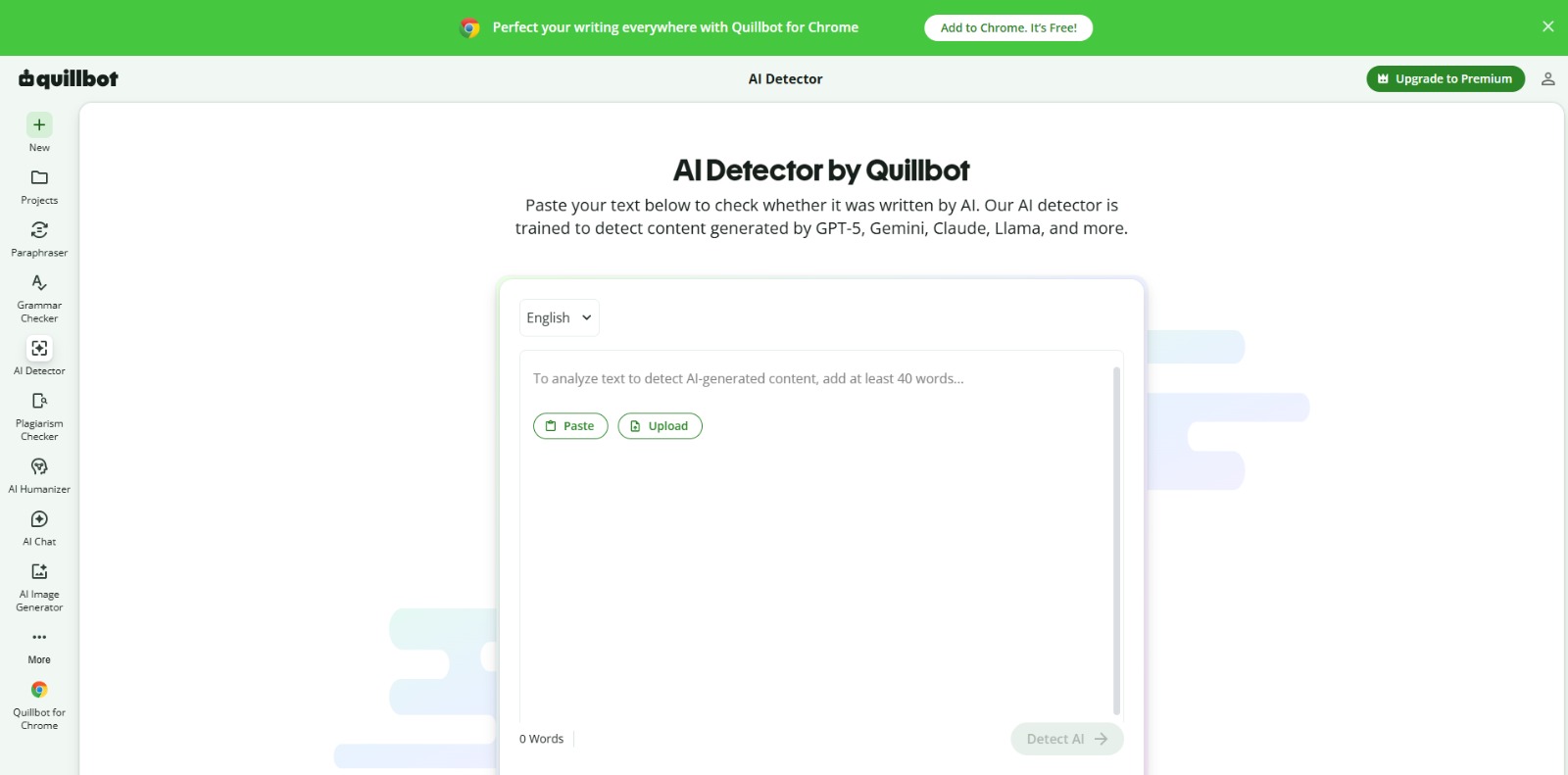
Using the QuillBot AI Detector is straightforward, making it accessible to users of all technical skill levels. The process is designed for speed and efficiency, aligning with the needs of users who are often working under tight deadlines or simply seeking a quick confirmation. Here’s a detailed guide on how to use it:
Step 1: Accessing the Tool
The QuillBot AI Detector is readily available through the QuillBot website. You don’t need to download any separate software. Simply navigate to the QuillBot homepage and look for the “AI Detector” option in the navigation menu. Clicking this will take you directly to the tool’s interface. For even faster access, consider adding the QuillBot Chrome extension; however, note that the AI detector itself remains web-based, even with the extension installed. This makes it universally accessible across different operating systems and devices. Remember to check if your desired language is supported, as the QuillBot AI Detector languages supported are not exhaustive.
Step 2: Inputting Your Text
Once you’re on the AI Detector page, you’ll find a large text box where you can paste the text you want to analyze. The tool supports both direct copy-pasting and manual typing. Keep in mind the QuillBot AI Detector word limit for the free version; exceeding this limit will require you to either upgrade to QuillBot Premium or split your text into smaller chunks. If you’re dealing with longer documents, this limitation can become a significant workflow bottleneck. It’s a crucial consideration when evaluating whether the free version meets your needs.
Step 3: Initiating the Analysis
After pasting your text, simply click the “Check AI” button located below the text box. The QuillBot AI checker will then begin analyzing your text, comparing it against its database of AI-generated writing patterns. This process typically takes just a few seconds, depending on the length of the text and the current server load. The speed of analysis is one of the tool’s key strengths, allowing for rapid feedback and minimal disruption to your workflow. Consider that the more complex and nuanced the text is, the longer it might take to process.
Step 4: Interpreting the Results
Once the analysis is complete, the QuillBot AI Detector will display a percentage score indicating the likelihood that the text was generated by AI. A higher percentage suggests a greater probability of AI involvement. However, it’s crucial to remember that this score is not a definitive judgment. It’s merely an indicator that should be interpreted in conjunction with other factors, such as the writing style, source, and context. Be particularly cautious of potential false positives, especially if the text contains unusual phrasing or complex vocabulary. If you want to see a more in-depth QuillBot AI Detector review, there are links to external resources available online. Also, consider the QuillBot AI Detector pricing & limits carefully before relying solely on the tool.
Step 5: Iterating and Refining (If Necessary)
If the QuillBot AI Detector returns a high score, don’t immediately assume the worst. Instead, carefully review the text and consider whether any sections might be triggering the AI detection algorithm. Look for overly generic phrasing, repetitive sentence structures, or a lack of originality in the ideas presented. If you identify such areas, try rewriting them in your own voice to inject more personality and creativity into the text. You can even send AI Detector results to QuillBot Paraphraser to rewrite suspected AI-generated content. This iterative process can help you “humanize” the text and reduce the likelihood of false positives. Remember that the goal is not to “beat the detector” but to ensure the authenticity and originality of your writing.
Once the question What Is Quillbot AI Detector is clear, our Review gives you a deeper look at value, pricing, and alternatives..
Unlocking Efficiency: Key Benefits and Expected ROI
The primary benefit of using the QuillBot AI Detector lies in its ability to provide a rapid, initial assessment of content originality. This saves time and effort compared to manual review, especially when dealing with large volumes of text. For educators, it can streamline the process of identifying potentially plagiarized or AI-generated student work. For content managers, it offers a quick way to vet freelancer submissions and ensure they meet quality standards. And for students and writers, it serves as a valuable safety net, providing peace of mind before submitting or publishing their work. Ultimately, the tool’s value proposition centers around efficiency, convenience, and risk mitigation.
The expected ROI from using the QuillBot AI Detector depends on the specific use case. For students, avoiding a false accusation of AI use can save their academic reputation and prevent potential disciplinary action. For content creators, ensuring originality can protect their brand and maintain audience trust. For businesses, avoiding penalties from search engines for publishing AI-generated spam can safeguard their SEO rankings and online visibility. Furthermore, the integration with other QuillBot tools, such as the Paraphraser and Grammar Checker, can enhance overall writing quality and productivity. To maximize your return, consider exploring QuillBot Premium, which offers unlimited access and advanced features. Check also if you can run plagiarism + AI detection together for a more robust content check.
Navigating the AI Frontier: Final Thoughts on QuillBot’s AI Detection Capabilities
In conclusion, the QuillBot AI Detector serves as a helpful, readily accessible tool for preliminary AI content assessment. While not a definitive authority, its speed and integration within the QuillBot suite make it a convenient first step in verifying originality. Understanding its limitations is key; always supplement its findings with human judgment and critical analysis. Ultimately, responsible AI use and maintaining authentic voice remain paramount.
Whether you are a student ensuring academic integrity or a content creator safeguarding your reputation, the QuillBot AI checker can be a valuable, but not infallible, ally in navigating the evolving landscape of AI-assisted writing. Remember to use it wisely and ethically.
Ready to Write with Confidence?
Don’t let the anxiety of AI detection hold you back from creating amazing content. Empower yourself with a tool that provides a quick, convenient, and integrated way to assess originality. While remember to use it to supplement, not replace, your critical thinking.
Start verifying your content’s authenticity today! Click here to try the QuillBot AI Detector and write with peace of mind.
QuillBot AI Detect FAQs
How accurate is the QuillBot AI Detector?
How accurate is the QuillBot AI Detector?
Can the QuillBot AI Detector detect ChatGPT content?
Can the QuillBot AI Detector detect ChatGPT content?
Is the QuillBot AI Detector free to use?
Is the QuillBot AI Detector free to use?
Does QuillBot offer a plagiarism check in addition to AI detection?
Does QuillBot offer a plagiarism check in addition to AI detection?
CharlieAITools was created with love to help you discover the best AI tools and transform your life, your ideas, and your projects. By signing up through my affiliate link, you help me keep this site running and continue to share valuable resources with fellow entrepreneurs. Thanks a ton for your support! 💛