Meshy Review: Unlocking Rapid AI 3D Model Generation for Creators
In this Meshy review, we’ll explore its core capabilities, who stands to benefit most, its advantages and limitations, and how it can streamline your 3D creation workflow.
The world of 3D design has long been a domain of specialized skills, complex software, and significant time investment. But what if you could conjure detailed 3D models, complete with textures and animations, from a simple text prompt or an image? That’s the promise of Meshy, an innovative AI 3D model generator designed to democratize 3D content creation. If you’re looking to accelerate your projects without sacrificing quality, this platform might just be the game-changer you need.
What Is This Tool?
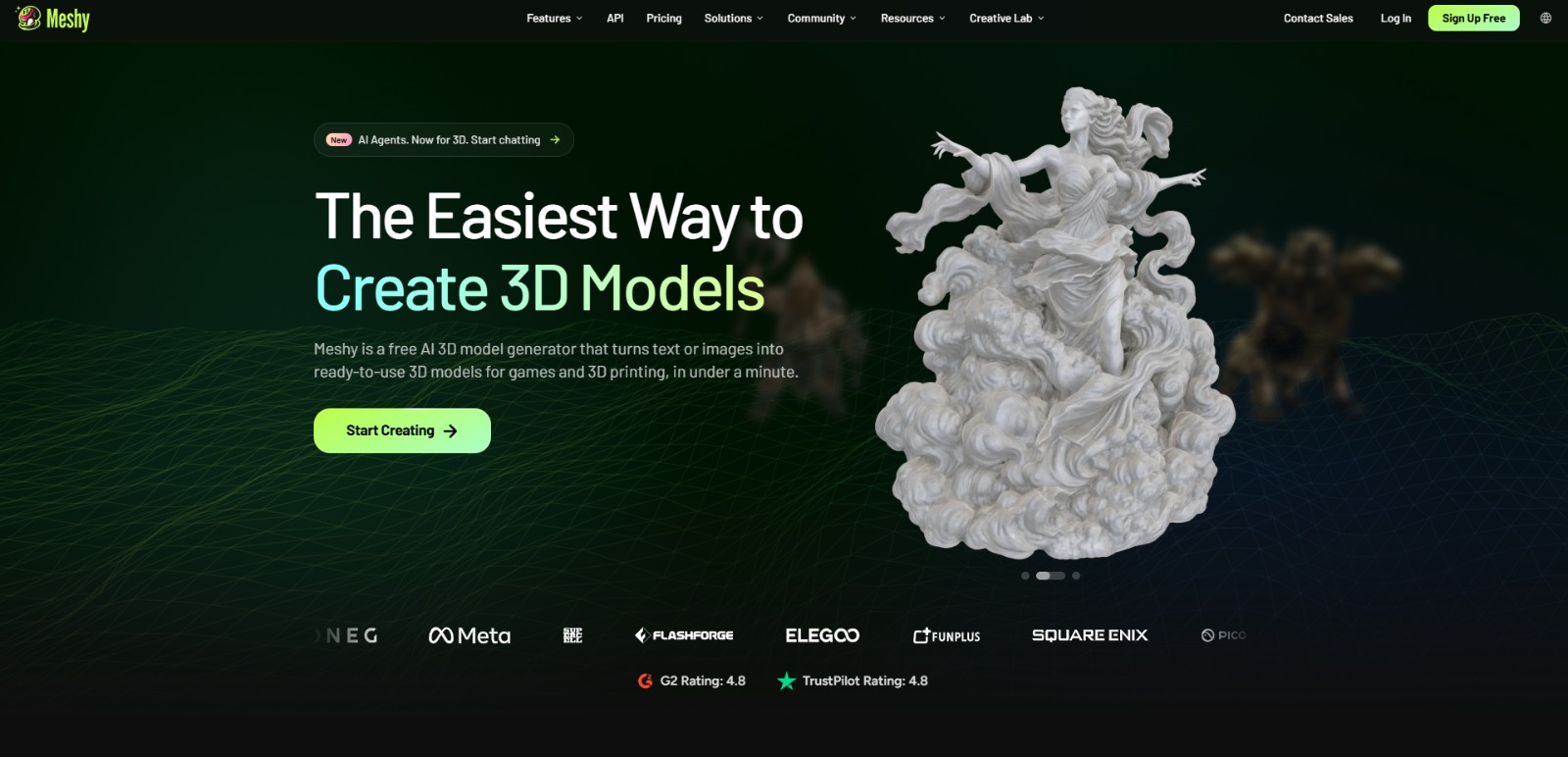
Meshy is a web-based AI platform that empowers users to generate 3D models from text descriptions or 2D images. Beyond just creating the base model, this AI solution also offers capabilities for AI texturing, applying PBR (Physically Based Rendering) maps, and even auto-rigging and animating 3D assets. It’s designed to simplify and speed up the entire 3D asset creation pipeline, making complex tasks accessible to a broader audience.
Why Is This Tool Important?
In today’s fast-paced digital landscape, the demand for 3D content is exploding across industries like gaming, virtual reality, product design, and 3D printing. However, traditional 3D modeling processes are notoriously complex, time-consuming, and often require years of specialized training or a substantial budget for professional artists. Many creators, from indie game developers to hobbyists, find themselves frustrated by the steep learning curve of traditional software and the high costs associated with outsourcing.
This is where AI 3D model generators like Meshy step in. They address the critical pain points of complexity, time, and cost by automating significant portions of the 3D creation workflow. Imagine being able to quickly prototype game assets, visualize product designs, or generate models for 3D printing without needing to master intricate sculpting tools or spend hours on manual texturing. The platform aims to bridge the gap between creative ideas and tangible 3D assets, empowering users to bring their visions to life faster and more affordably. It’s a crucial tool for anyone looking to overcome the barriers of traditional 3D production and unlock new levels of creative efficiency.
Top Features of This Tool
Meshy offers a suite of powerful AI-driven features designed to streamline the 3D asset creation process from start to finish. Here’s a look at its core capabilities:
AI 3D Model Generation (Text-to-3D & Image-to-3D)
The cornerstone of this platform, this feature allows users to generate complex 3D models simply by typing a descriptive text prompt or uploading a 2D image. Whether you need a fantastical creature, a realistic object, or an architectural element, the AI interprets your input and constructs a 3D mesh, significantly reducing the initial modeling time.
AI Texturing with PBR Maps
Once a 3D model is generated, applying high-quality textures can be another time-consuming task. This tool automates the texturing process, generating realistic PBR (Physically Based Rendering) maps that ensure your models look great in various lighting conditions and game engines. This feature is crucial for achieving professional-grade visuals without manual effort.
AI Auto-Rigging and Animation
Bringing 3D characters and objects to life often requires intricate rigging and animation. The software includes capabilities for auto-rigging, which automatically creates a skeletal structure for your models, and AI-powered animation, allowing for quick and easy movement generation. This is a huge time-saver for game developers and animators.
Optimized for 3D Printing & Game Assets
Understanding the diverse needs of its users, this AI solution is designed to produce models that are not only visually appealing but also functional. It focuses on generating models suitable for 3D printing, ensuring they are watertight and manifold, and creating game-ready assets that can be easily integrated into popular game engines.
Intuitive Web-Based Platform
As a cloud-based tool, Meshy is accessible directly through your web browser, eliminating the need for powerful local hardware or complex software installations. Its user-friendly interface aims to make advanced 3D creation accessible even to those without extensive technical expertise.
AI Image Generation for 3D Assets
Beyond generating 3D models, the platform also offers AI image generation capabilities that can be utilized to create source material or textures, further integrating and streamlining the entire creative workflow within a single environment.
Key Benefits
- Rapid 3D Asset Creation: Generate complex 3D models, textures, and animations in a fraction of the time compared to traditional methods.
- Reduced Costs: Significantly lower expenses associated with hiring 3D artists or purchasing expensive software licenses.
- Lower Barrier to Entry: Empowers users without extensive 3D modeling expertise to create high-quality assets.
- Enhanced Creative Workflow: Accelerate prototyping, iteration, and final asset production for various projects.
- Production-Ready Outputs: Delivers models optimized for specific uses like 3D printing and integration into game engines.
Pros
- Transforms text and images into 3D models quickly and efficiently.
- Integrated AI texturing and animation features streamline the entire pipeline.
- Web-based accessibility means no heavy software installation required.
- Designed to produce models suitable for practical applications like 3D printing and game development.
Cons
- The quality and uniqueness of AI-generated models can sometimes vary, potentially requiring minor post-processing for highly specific artistic visions.
- As with any evolving AI technology, advanced features or integrations may have a learning curve for new users.
Who Should Use It?
This AI 3D model generator is particularly well-suited for individuals and teams looking to accelerate their 3D content creation without the traditional hurdles.
Game Developers (Indie & AAA)
- Quickly prototype game environments and characters.
- Generate unique assets to populate virtual worlds.
- Reduce development time and costs for 3D art.
3D Printing Enthusiasts & Product Designers
- Rapidly create printable 3D models from concepts or images.
- Iterate on product designs and prototypes with ease.
- Overcome the technical challenges of preparing models for printing.
3D Artists & Modelers
- Augment existing workflows by generating base meshes or textures.
- Explore new creative directions and quickly test ideas.
- Automate tedious tasks like rigging and basic animation.
AR/VR Developers & Motion Graphics Designers
- Generate immersive 3D content for augmented and virtual reality experiences.
- Create dynamic 3D elements for motion graphics projects.
- Speed up asset creation for interactive digital environments.
Educators & Students
- Provide accessible tools for learning 3D concepts without complex software.
- Enable rapid project creation for educational purposes.
- Experiment with AI in creative fields.
❤️ Also loved by: Hobbyists, Content Creators, Technical Artists, Architects, Interior Designers, Marketing Professionals, E-commerce Businesses, Metaverse Builders, Digital Sculptors, VFX Artists, Animators, Concept Artists, Indie Filmmakers, Virtual Event Organizers.
Best AI Categories
Meshy fits into these categories. Explore each page for alternatives and related tools.
Best Alternatives
If Meshy is not a perfect fit, these alternative AI tools may cover different budgets, features, and use cases in AI 3D MODELING. Compare strengths, positioning, and why each tool might be a better fit for a specific workflow.
- Luma AI: Known for its advanced photorealistic 3D capture and generation capabilities, Luma AI is a strong alternative for users prioritizing high-fidelity outputs, especially from video inputs, and exploring NeRF technology.
- Kaedim: This tool specializes in converting 2D images into 3D models, often with a focus on game development and optimizing assets for various engines. It could be a better fit for users with a large library of 2D concept art they wish to transform.
- Masterpiece Studio: Offering a comprehensive suite for AI-powered 3D creation, Masterpiece Studio provides tools for modeling, rigging, and texturing, making it a robust alternative for users seeking an all-in-one solution with more manual control alongside AI assistance.
Pricing & Plans: Costs, Features & Value
While specific pricing details for Meshy are not clearly specified in the available context, AI tools of this caliber typically offer a range of plans, often including a free tier for basic usage, followed by subscription models that unlock more generations, advanced features, and higher-quality outputs. Value is usually derived from the time saved, the complexity of models generated, and the integration capabilities with existing workflows. Users should always check the official Meshy website for the most current information regarding pricing, available plans, and feature sets before making any decisions, as these details can evolve with platform updates.
Ready to Transform Your 3D Workflow?
The future of 3D content creation is here, and it’s powered by AI. If you’ve been held back by the complexities, costs, or time commitments of traditional 3D modeling, Meshy offers a compelling solution to bring your creative visions to life with unprecedented speed and efficiency. Imagine the possibilities for your game projects, product designs, or artistic endeavors when you can generate high-quality 3D assets almost instantly. This platform is more than just a tool; it’s a gateway to unlocking new levels of productivity and creative freedom.
If Meshy aligns with your needs for rapid AI 3D model generation, why not explore its capabilities firsthand? Discover how this innovative AI solution can empower your projects and streamline your creative process today. Visit Meshy to learn more and get started.
CharlieAITools was created with love to help you discover the best AI tools and transform your life, your ideas, and your projects. By signing up through my affiliate link, you help me keep this site running and continue to share valuable resources with fellow entrepreneurs. Thanks a ton for your support! 💛