What Is Microsoft Copilot 3D and How Does It Help with AI 3D Converter?
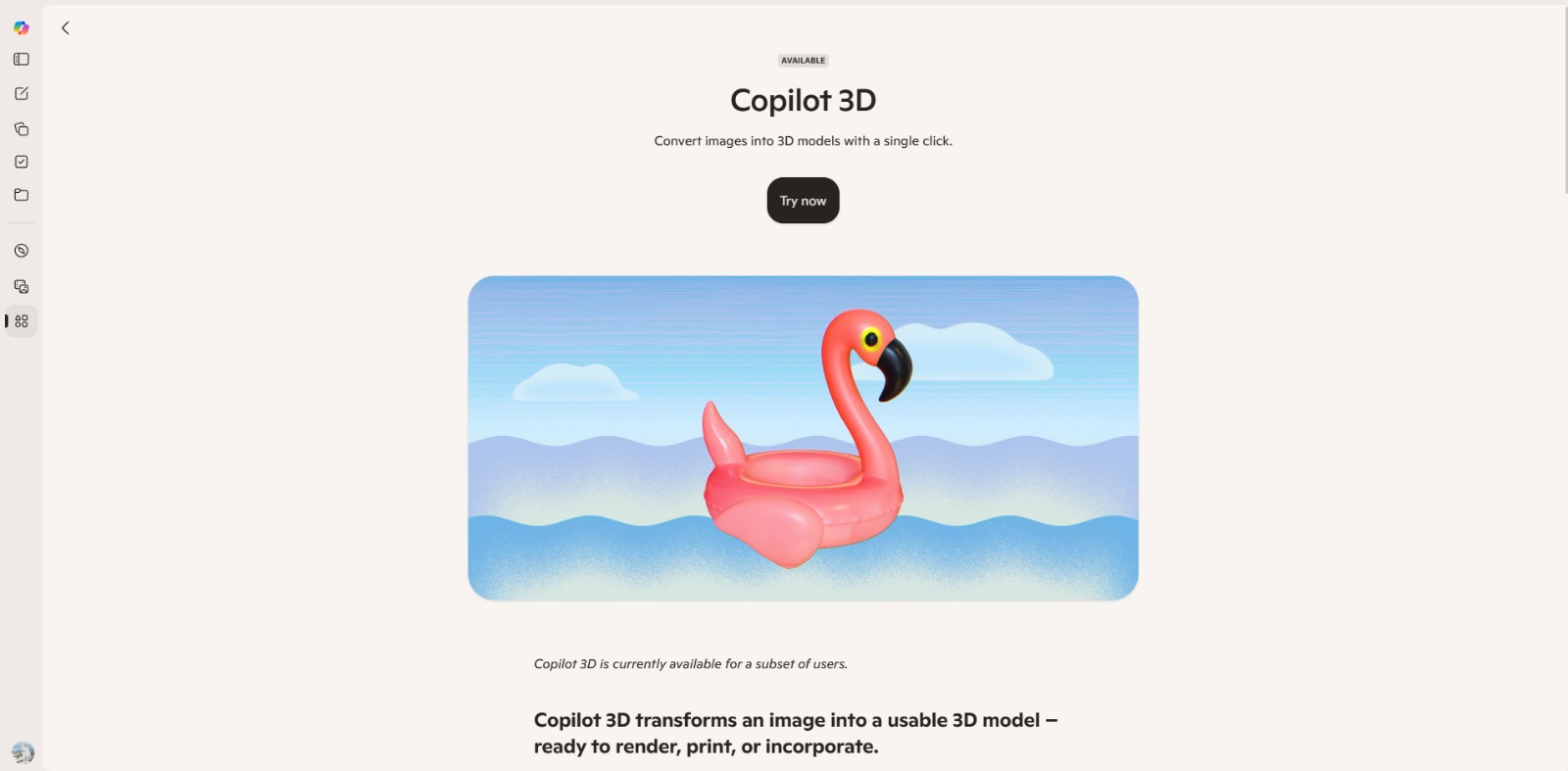
Have you ever wished you could transform a simple image into a dynamic 3D model with just a few clicks? Many aspiring creators and seasoned professionals often ask, “what is this AI tool?” when they encounter the complexities of 3D content creation. They’re looking for a simpler path, bypassing the steep learning curves and time investment of traditional methods. This innovative platform, Microsoft Copilot 3D, is designed to be an accessible AI 3D converter, making the complex process of 3D modeling more approachable for everyone.
Understanding this tool is crucial for anyone looking to streamline their creative workflow, whether you’re an indie game developer, an AR/VR enthusiast, or a product designer. It represents a significant step towards democratizing 3D content, allowing users to rapidly prototype ideas and generate assets without needing extensive technical expertise. By leveraging artificial intelligence, Microsoft Copilot 3D aims to unlock new possibilities and empower creators to bring their visions to life faster than ever before. After learning What Is Microsoft Copilot 3D, visit our full Microsoft Copilot 3D to see if it’s the right AI tool for your workflow.
The Challenge: Why Traditional 3D Modeling Can Be a Creative Roadblock
For many creators, the journey into 3D modeling often hits a wall of complexity. Traditional 3D software tools are powerful, but they come with a notoriously steep learning curve. Mastering intricate interfaces, understanding complex mesh topology, and learning specialized techniques can take months, even years, of dedicated practice. This significant time investment can be a major deterrent for hobbyists and small teams who need to produce 3D assets quickly without becoming full-time 3D artists.
Beyond the learning curve, the financial cost of professional 3D modeling software can be prohibitive. High subscription fees or expensive perpetual licenses often put these essential tools out of reach for independent creators or those on a tight budget. This combination of time and money creates a significant barrier, forcing many to compromise on their creative vision or abandon 3D projects altogether. The dream of bringing 2D concepts into a three-dimensional world often remains just that—a dream.
Beyond the Basics: More Hurdles for Aspiring 3D Creators
Even when creators overcome the initial hurdles of learning and cost, other frustrations quickly emerge. One common challenge is the sheer time it takes to create even simple 3D models from scratch. Manual modeling is a meticulous process, demanding hours of detailed work for every asset. For projects requiring numerous unique 3D elements, this can lead to significant delays and slow down the entire development cycle, impacting deadlines and overall productivity.
Another major pain point is the difficulty of converting existing 2D imagery into usable 3D models. Many projects start with sketches, photographs, or concept art, but transforming these flat visuals into a volumetric asset traditionally requires extensive manual reconstruction. This often means recreating details from scratch, which is incredibly time-consuming and prone to inconsistencies. Aspiring creators often find themselves wishing for a magic button to bridge this 2D-to-3D gap.
The Real Cost: How These 3D Modeling Challenges Impact Your Projects
These persistent challenges in 3D modeling aren’t just minor inconveniences; they carry significant costs for creative projects. Lost time due to manual modeling and steep learning curves directly translates into missed opportunities. Indie game developers might miss release windows, AR/VR content creators could fall behind market trends, and product designers might struggle to rapidly prototype new ideas, all because the 3D asset pipeline is too slow and cumbersome.
Furthermore, the high cost of traditional software and the expertise required can lead to creative blocks and lower quality work. When resources are stretched thin, creators might settle for generic assets or simpler designs, sacrificing uniqueness and innovation. This can result in projects that don’t fully capture their original vision or stand out in a competitive landscape. The inability to easily experiment with 3D concepts stifles the very creativity that drives these endeavors.
Ultimately, these problems create a bottleneck that prevents many talented individuals from fully exploring the potential of 3D. The friction involved in generating assets from existing images, coupled with the overall complexity, can lead to frustration and a sense of being overwhelmed. This not only impacts project timelines and budgets but also limits the accessibility of 3D design to a select few, rather than empowering a broader community of innovators and hobbyists.
Microsoft Copilot 3D: Bridging the Gap from 2D Ideas to 3D Reality
After wrestling with the complexities and costs of traditional 3D modeling, many creators feel a profound sense of relief when they discover Microsoft Copilot 3D. This innovative platform steps in as a powerful AI 3D converter, specifically designed to dismantle those creative roadblocks we discussed earlier. Imagine turning a sketch, a photograph, or even a basic concept art piece into a fully realized 3D asset with remarkable ease, all without needing years of training or an expensive software suite. That’s the core promise this AI solution delivers, making sophisticated 3D creation accessible to a much wider audience and truly democratizing the field.
This platform is built for anyone who’s ever wished for a simpler way to bring their visions to life – from indie game developers needing quick prototypes to product designers visualizing concepts, and even hobbyists exploring new creative avenues. The core idea behind Microsoft Copilot 3D is to empower you to focus on your artistic ideas rather than getting bogged down by technical hurdles. By leveraging advanced artificial intelligence, this AI tool streamlines the often-frustrating process of turning flat images into dynamic, volumetric models, effectively solving the critical 2D-to-3D conversion challenge that plagues so many projects and empowers creators to innovate faster. This means less time struggling with software and more time creating.
The Magic Behind the Scenes: How Microsoft Copilot 3D Works
Understanding how Microsoft Copilot 3D works is key to appreciating its power and how it tackles the challenge of 2D-to-3D conversion. While the underlying AI is incredibly sophisticated, the user experience is designed to be remarkably intuitive. Think of it as having a highly skilled 3D artist at your fingertips, ready to interpret your 2D input and translate it into a three-dimensional form. The process generally follows a clear, guided path, making it accessible even if you’re new to the world of 3D modeling. Let’s walk through the typical workflow, which is a core part of what this AI tool offers.
1. Providing Your 2D Input
The journey begins with your source material. Microsoft Copilot 3D is primarily an AI 3D converter, meaning it takes your existing 2D assets and uses them as a blueprint. This could be anything from a photograph of an object, a hand-drawn sketch, a digital illustration, or even a simple texture map. You’ll typically upload or import your chosen image directly into the platform, much like you would with any other creative software. The clearer and more detailed your input, the better the AI can interpret its form and characteristics. It’s like giving your virtual artist a clear reference photo – the more information, the richer the result.
2. AI-Powered 3D Generation
Once your 2D input is provided, the AI takes over. This is where the true innovation of Microsoft Copilot 3D shines. The platform’s advanced algorithms analyze your image, identifying shapes, contours, depth cues, and even potential material properties. It then intelligently reconstructs this information into a preliminary 3D model. This isn’t just a simple extrusion; the AI attempts to understand the object’s likely volumetric form, generating a mesh that represents its three-dimensional structure. This complex process happens behind the scenes, often within moments, transforming what would traditionally take hours of manual effort into a rapid, automated step.
3. Review and Refinement
After the initial AI generation, you’ll be presented with a preview of your new 3D model. This is your opportunity to review the results and make any necessary adjustments. While the AI is incredibly smart, sometimes a little human touch goes a long way! The platform typically offers intuitive tools for refining the model. You might adjust the mesh density, smooth out surfaces, or tweak certain dimensions. This AI solution may also allow you to apply basic textures or colors, further enhancing the model’s appearance. This iterative process ensures that the final output aligns perfectly with your creative vision.
4. Exporting Your 3D Asset
Once you’re satisfied with your newly created 3D model, the final step is to export it. Microsoft Copilot 3D is designed to be a versatile tool, and as such, it typically supports various standard 3D file formats. This flexibility means you can seamlessly integrate your generated assets into other creative software, game engines, AR/VR environments, or design applications. Whether you’re building a virtual world, prototyping a physical product, or simply creating stunning visuals, the ability to easily export your work ensures that your 3D creations can be utilized wherever your projects take you. It truly empowers a broader creative workflow.
The Real Value: How Microsoft Copilot 3D Empowers Your Creative Projects
The benefits of integrating Microsoft Copilot 3D into your creative workflow are truly transformative, directly addressing the pain points we explored earlier. First and foremost, it’s a massive time-saver. Gone are the days of spending countless hours meticulously modeling every detail from scratch or struggling with complex mesh topology. This AI solution drastically reduces the time required to generate 3D assets, allowing you to rapidly prototype ideas and bring concepts to life much faster.
For indie developers or small design teams, this means hitting deadlines more easily and iterating on designs with unprecedented agility. It truly simplifies workflows, freeing up valuable time for what matters most: your creativity. Beyond speed, this platform democratizes 3D content creation, making it accessible to a broader audience than ever before. The steep learning curve and high cost associated with traditional 3D software are significantly lowered, empowering aspiring creators and hobbyists to dive into 3D without financial or technical barriers.
This fosters greater creativity and experimentation, as you’re no longer limited by your software expertise but rather by your imagination. The ability to effortlessly convert 2D images into 3D models also enhances content quality and uniqueness, allowing you to use your original concept art directly. It’s about empowering you to achieve better outcomes and fully realize your creative vision, making 3D design less daunting and more enjoyable.
Unlocking Your Creative Potential with AI-Powered 3D
So, what is this AI tool, Microsoft Copilot 3D, truly about at its core? It’s a game-changer for anyone who’s ever felt the pull of 3D creation but was held back by the traditional hurdles of complexity, cost, or a steep learning curve. This platform stands out as a powerful AI 3D converter, specifically engineered to transform your 2D visions into dynamic 3D realities with remarkable ease. It’s not just about making a model; it’s about democratizing access to a creative dimension previously reserved for specialists, empowering a wider audience to explore and innovate.
Its durable value lies in its ability to significantly reduce the time and effort required for 3D asset generation, allowing creators – from indie game developers and product designers to digital artists and hobbyists – to focus on their artistic ideas rather than technical struggles. By streamlining the workflow and making sophisticated tools accessible, Microsoft Copilot 3D helps you iterate faster, visualize concepts more clearly, and ultimately bring your unique creative visions to life. As capabilities evolve, always check the official Microsoft Copilot resources for the most up-to-date features and possibilities.
Transform Your Ideas into Tangible 3D Realities
Are you tired of your brilliant 2D concepts staying flat on a screen or trapped in your imagination? Microsoft Copilot 3D offers a liberating solution, empowering you to bridge that gap with unprecedented ease. Imagine the freedom of rapidly prototyping your game assets, visualizing your product designs, or bringing your digital art to life in a whole new dimension, all without the traditional headaches.
This AI solution isn’t just a tool; it’s your creative partner, designed to save you time, reduce frustration, and unlock new possibilities. It allows you to focus on what you do best – creating – while the AI handles the complex translation from 2D to 3D. Embrace a workflow where your imagination is the only limit, and see your visions take on a new, tangible form.
Ready to bridge the gap from imagination to a fully realized 3D model? Discover how Microsoft Copilot 3D can revolutionize your creative process and bring your visions to life with unprecedented ease. Take the first step towards effortless 3D creation today!
Microsoft Copilot 3D FAQs
What is Microsoft Copilot 3D primarily used for?
What is Microsoft Copilot 3D primarily used for?
Who can benefit most from using this AI tool?
Who can benefit most from using this AI tool?
How does Microsoft Copilot 3D generally convert 2D to 3D?
How does Microsoft Copilot 3D generally convert 2D to 3D?
Is Microsoft Copilot 3D suitable for beginners in 3D design?
Is Microsoft Copilot 3D suitable for beginners in 3D design?
CharlieAITools was created with love to help you discover the best AI tools and transform your life, your ideas, and your projects. We aim to share valuable resources with fellow entrepreneurs. Thanks a ton for your support!